My home network has been mostly the same since I’ve had my first broadband connection. There is always a small server running DHCP and DNS. A separate router that only does NAT to the outside world.
This last year I decided to up level my home network a bit by introducing some VLANs for network separation. Nothing super complicated, just separate networks to keep guest and IoT traffic separate from the main lan. Another requirement I had was that I wanted DDNS to work. If a client connects I want client.lan/iot/guest to be available from my DNS server. Turns out this was harder than anticipated. The solution I can up with at the time was to layer DNS servers so that Bind was accepting DDNS updates but then delegating to a pi-hole for ad and malware blocking. This worked alright but seemed like way more than I needed. At the same time I was learning Rust and thought writing my own DNS server to handle all of this would be a great project. Once I had a DNS server running that worked for me, I wanted to take it a bit further and see if I could replace all my base network services with Rust equivalents.
Lay of the LAN
My home network is simplish. I have an untagged subnet that is the main network where all the servers live. There are 2 additional Vlans for guest and iot traffic. For each subnet I have an internal domain (lan, guest, iot) that I want the hosts to publish their name to.
A simplified chart of what the topology looks like.
  flowchart TD
A[.lan] -- 192.168.0.0/24 --> D
B[.guest]  -- 192.168.77.0/24 --> D
C[.iot] -- 192.168.88.0/24 --> D
D[switch] --> F
E[server] --> D
F[router]
And what it looks like in real life!
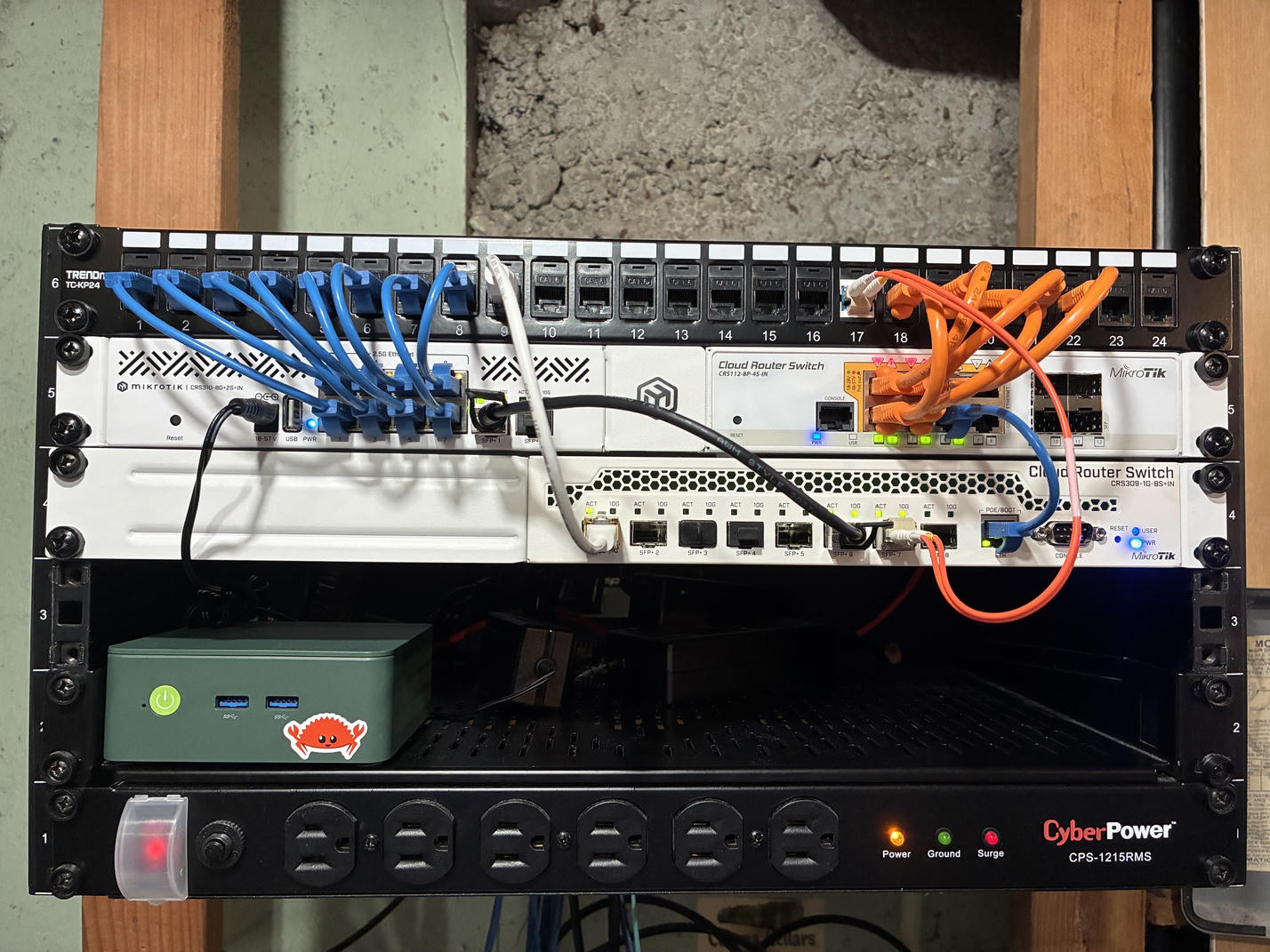
I mainly included this picture because of my sweet Ferris sticker.
DNS
I wrote a short post last year on how to get started writing a DNS server in Rust. This project is based on the Hickory project. My first implementation was more of a custom wrapper around their server implementation with some custom handlers. Once I had that stable I went a step further and wrote my own server using the Hickory library for the parsing of DNS packets. It's a great project and the folks are doing some great work. If you are curious why someone would want to write a DNS server in Rust when Bind exists, take a look at the Bind source, it's a fun software archaeology project.
My DNS server project is called Home DNS, because we have DNS at home. It's pretty lightweight, I was running it on a pi-zero 2 for a while but upgraded to a beefer machine because I wanted to do faster Wireguard termination. It's just compliant enough to function on the sunny path that is my home network.
DHCP
Finding a Rust based alternative to Kea was pretty difficult. There was only one option that I could find Dora from BlueCat Engineering. This project is built in a similar fashion to Hickory. There is a core parsing library dhcproto that handles the packet parsing and Dora is the server implementation.
This project has some rough edges, but so does Kea. I'm glad that it exists. I've started contributing to it a bit and plan to continue as time allows. Having a hackable dhcp server is definitely useful.
NTP
I learned about ntpd-rs from memorysafety.org. This project has just been a drop in replacement for ntpd on my servers. Runs great and has lots of prebuilt binaries.
Putting it together
If you want to duplicate my setup. See the respective Dora and Home DNS Readmes for installation instructions. Once they are installed the configuration is pretty straight forward. First thing is to create your shared key for DDNS updates.
tsig-keygen -a hmac-sha256 mykey
The output of that command will be needed to configure both Dora and Home DNS. The output should look like
key "mykey" {
       algorithm hmac-sha256;
       secret "b2yeUCDPSTVkL0Ojz/syuNIafpNv/0g7arTLKgMev1s=";
};
For Home DNS the key can be added to the config like :
[[ddns-key]]
name = "mykey."
key = "b2yeUCDPSTVkL0Ojz/syuNIafpNv/0g7arTLKgMev1s="
Note the trailing . of the name. It's required for this configuration. In addition to the key, an SOA record is needed to signify that this server is the owner of the domain you are sending updates for. For example the .lan domain will have an entry in the config.
[[soa]]
name = "lan."
mname = "ns1.lan.lan."
rname = "admin.lan."
serial = 38410
refresh = 604800
retry = 86400
expire = 2419200
minimum = 604800
Repeat the soa process for the other domains, .guest, .iot, changing the name,mname and rname accordingly.
For the Dora configuration. First thing is to ensure that option 15 is set to the corresponding domain. This is how the DDNS to subnet mapping is done.
...
options:
   values:
       ...
       15:
           type: str
           value: "lan"
       ...
Next add the key to the ddns section of the config. For example:
ddns:
   enable_updates: true
   override_client_updates: true
   override_no_updates: true
   forward:
      - name: "lan."
        key: "mykey"
        ip: 192.168.0.10:53
   reverse:
      - name: "192.168.0.in-addr.arpa."
        key: "mykey"
        ip: 192.168.0.10:53
   # map of tsig keys. DNS servers reference these by name
   tsig_keys:
       mykey:
         algorithm: "hmac-sha256"
         # b64 key data
         data: "b2yeUCDPSTVkL0Ojz/syuNIafpNv/0g7arTLKgMev1s="
The names in the forward and reverse sections can be repeated for additional domains. The key can be reused, make sure to update the ip to where your DNS server is running.
To verify you can add the DORA_LOG=debug environment variable. You should see output like :
Feb 13 11:08:26 dns dora[18660]: 2026-02-13T19:08:26.869117Z DEBUG v4:handle:send_dns{domain=TY_WR.iot. duid=DhcId { ty: Chaddr, id: [104, 87, 45, 39, 160, 167] } leased_ip=192.168.88.130}: ddns: updated DNS
Alternatively you can just query the DNS server for a domain you think should be there.
Hope this has been helpful if you're interested in this kind of thing. If you run into any issues shoot me a message and I'll try and help you out.